Skip to content

Incident response for engineering and security

Run incidents the same way every time.

From the first alert to the signed-off postmortem, Resolvo runs the process your team defined, in the chat tools you already use.

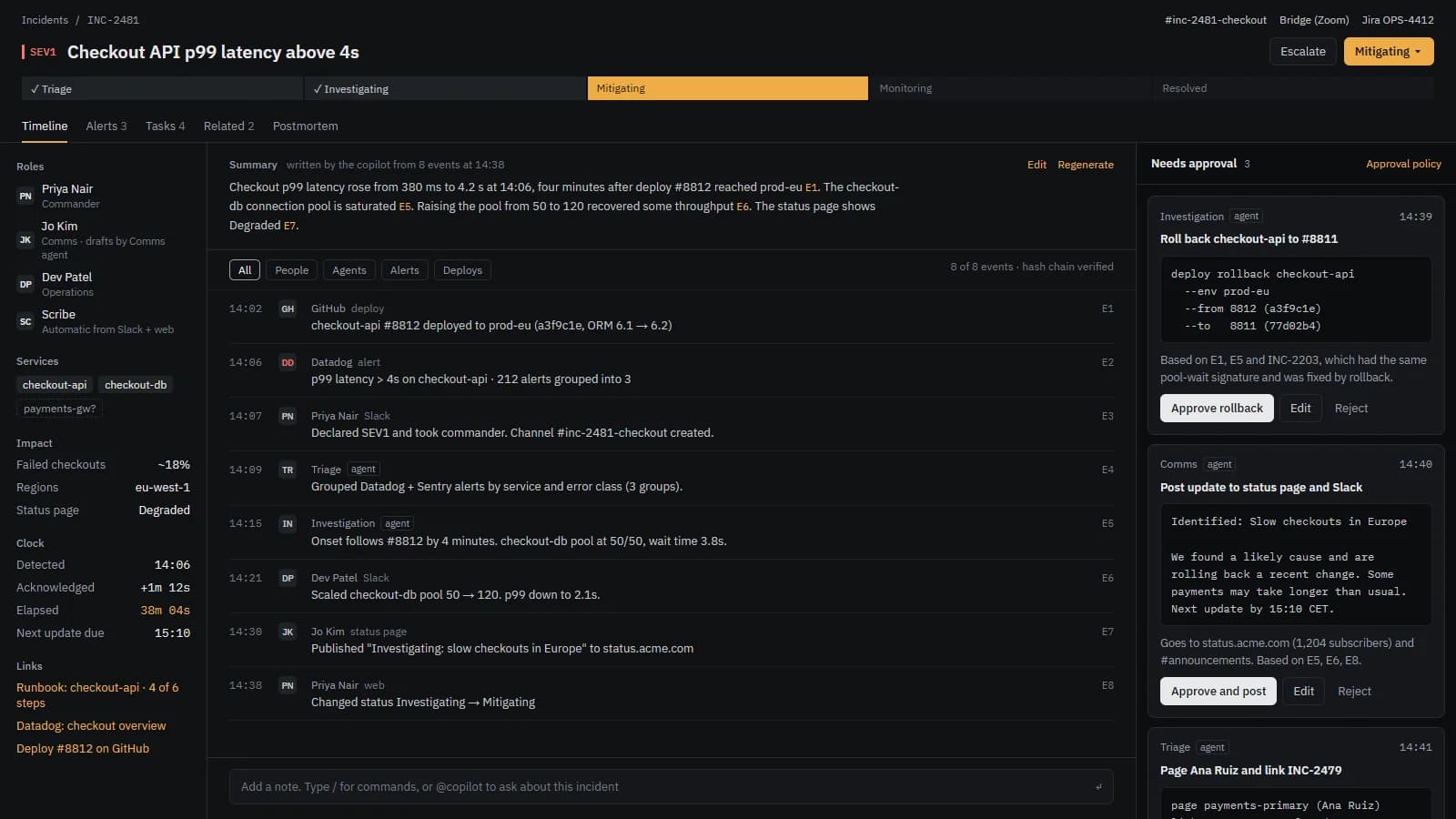
Incident room for a sample SEV1: the summary card, the roles and the event timeline shown side by side.
Incident room with summary, roles and timeline · Sample data

The problem

Most incidents still run on habit.

  1. 01

    Every incident is handled differently.

    The same kind of outage gets a different room, different roles and a different order of steps, depending on who is on call.

  2. 02

    Context is scattered.

    The alert sits in one tool, the discussion in chat, the decisions in a document and the evidence in a ticket. Nobody has the whole picture.

  3. 03

    Follow-ups do not close.

    Postmortems start late, action items lose their owners and the same cause comes back months later.

How it works

From the first alert to the review, in four steps.

  1. Step 1

    Alert

    Monitoring alerts are routed, de-duplicated and filtered. They can open an incident or page on-call automatically.

  2. Step 2

    Declare

    Declare in Slack, Teams or the web. The room is created, the right people are added and the summary card starts.

  3. Step 3

    Process runs

    The process your team defined runs: stages, gates, checklists and roles. Stakeholder updates go out on a cadence set by severity.

  4. Step 4

    Review and learn

    The postmortem is pre-filled from the timeline. Several people review and sign it off. Action items keep their owners and reminders.

Process engine

Each step is a rule your team wrote.

You define what happens at each stage, per incident type or team. Nothing happens by hidden default, and a change is tested on a real incident before it goes live.

Rule editor · Standard process

Sample data

When an incident is declared, if severity is SEV1, open the room, add the on-call lead, post an update, and open a ticket.

  • Open room
  • Add on-call lead
  • Post update
  • Open ticket
Stages and gates · INC-2481

Sample data

  1. Stage 1DeclaredGate: Severity is set
  2. Stage 2TriageGate: Owner is named
  3. Stage 3MitigatingGate: Checklist is complete
  4. Stage 4ResolvedGate: Reason is recorded and checklist is complete
  5. Stage 5PostmortemGate: Reviewers have signed off
Run history · dry run on INC-2481

Sample data

  1. 14:07Declared. Room created.
  2. 14:07Rule 1 ran: opened room, added on-call lead, posted update, opened ticket.
  3. 14:09waitingTriage gate waited for an owner.
  4. 14:12Owner named. Gate passed.
  • Stages with gates. Closing needs a recorded reason and a completed checklist.
  • Rules written as sentences. Wait, repeat and approvals are steps in the same rule.
  • Dry run on a real incident before a rule goes live.
  • Full run history on every incident, showing which rule ran and what it did.
  • Starter processes (Standard, Security, Customer-facing) that you edit freely.
  • Custom intake forms, severities and triage questions. An answer such as "personal data involved?" makes the incident private and adds the privacy lead.
  • Checklists and runbooks that run in the incident room.
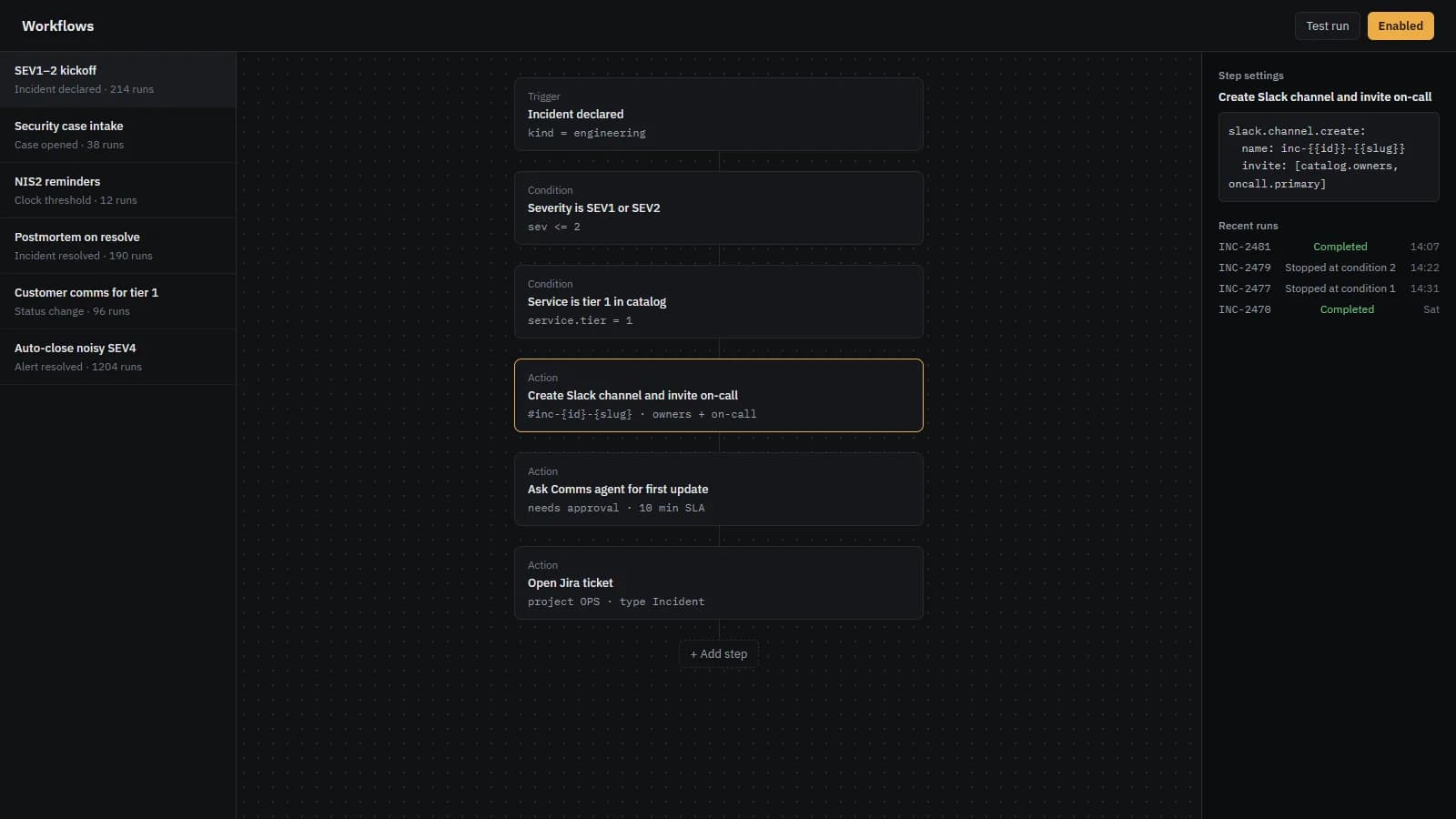
Workflow builder with the stages of a process, their gates and the rules attached to each stage.
Workflow builder · Sample data

Engineering and security

An outage and a breach case share one timeline.

Cases, evidence and indicators sit next to the on-call response, not in another tool. Regulatory clocks start at the moment of awareness and run beside the timeline they belong to. Times are CET.

SEV1 outage: checkout API

  1. 14:02Deploy: checkout-api release to production.
  2. 14:06Alert: Checkout API latency above 4s.
  3. 14:07Declared SEV1. Room created.
  4. 14:09Roles set: commander, scribe, comms.
  5. 14:38Status changed to Mitigating.

Sample data

Data breach case: phishing report

  1. 09:12Report: phishing email reported by finance team.
  2. 09:20Case opened. Access is limited to case members.
  3. 09:34Indicator added with TLP:AMBER on the sender domain.
  4. 09:40Evidence sealed in the vault. Hash recorded.

NIS2 early warning (24h): 17h 42m left

GDPR notification (72h): 2d 17h 42m left

Sample data

Sources: NIS2 Directive (EU) 2022/2555, Article 23 (early warning within 24 hours of becoming aware of a significant incident) and GDPR Regulation (EU) 2016/679, Article 33 (notification within 72 hours of becoming aware of a personal data breach).

Private cases stay private. Access is enforced in the database, and the chat room follows the same rule.

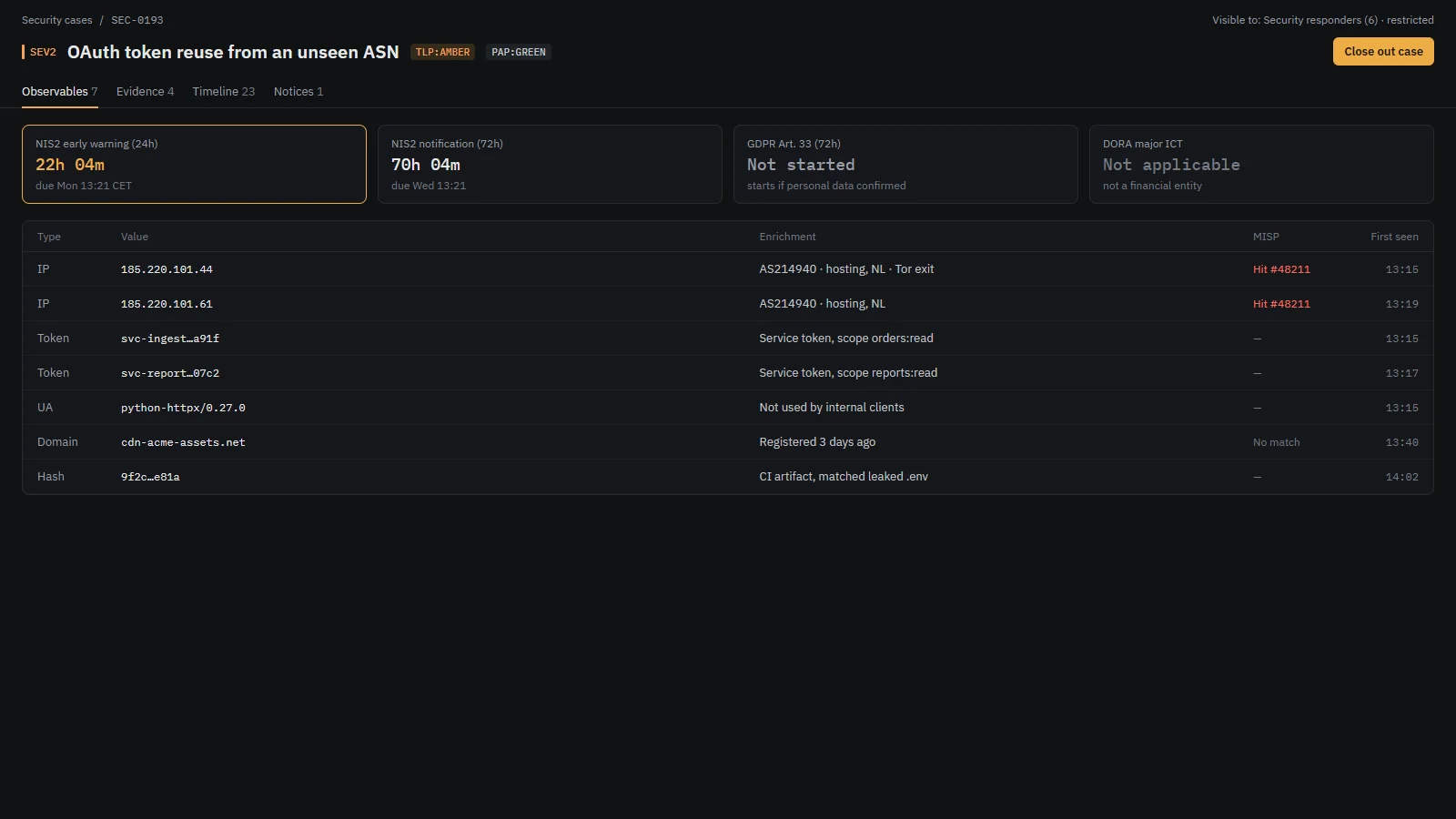
Security case with its timeline, indicators, evidence custody and the regulatory clock.
Security case with regulatory clock · Sample data

Slack and Microsoft Teams

The same incident room in Slack and Teams.

A declared incident opens a room in the chat tool your team uses. The room gets the summary card and the actions, and it is archived and cleaned up at close. Both tools get the same depth.

Slack

# inc-checkout-room

Resolvo 14:07 CET

Incident declared. Room created and the on-call lead added.

SEV1 · Mitigating

Checkout API latency above 4s

Commander: on-call lead. Scribe: unassigned. Next update due 14:45 CET.

AcknowledgeAdd updateOpen timeline

Sample data

Microsoft Teams

Incident room

Resolvo 14:07 CET

Incident declared. Room created and the on-call lead added.

SEV1 · Mitigating

Checkout API latency above 4s

Commander: on-call lead. Scribe: unassigned. Next update due 14:45 CET.

AcknowledgeAdd updateOpen timeline

Sample data

On-call and alerts

Alerts reach the right person, and stop when someone takes them.

  • Alerts from monitoring tools are routed, de-duplicated and noise-filtered.
  • An alert can open an incident or page on-call automatically.
  • On-call schedules, rotations and escalation policies, with a clear owner at every hour.
  • Acknowledging an alert stops its escalation.
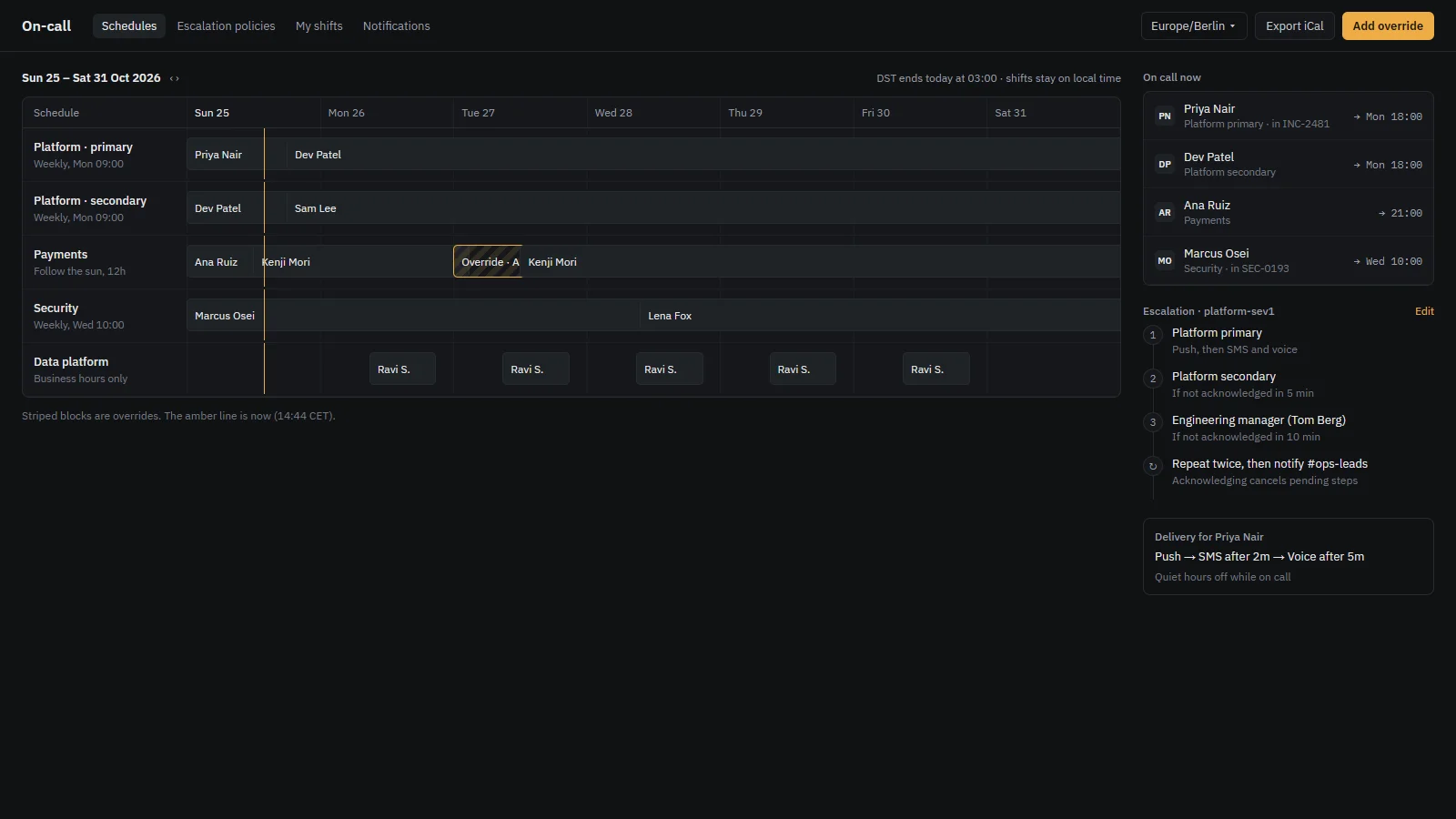
On-call view with the current rotation, escalation steps and the alerts waiting for acknowledgement.
On-call schedule and escalation · Sample data

After the incident

Postmortems start from the timeline, and follow-ups stay owned.

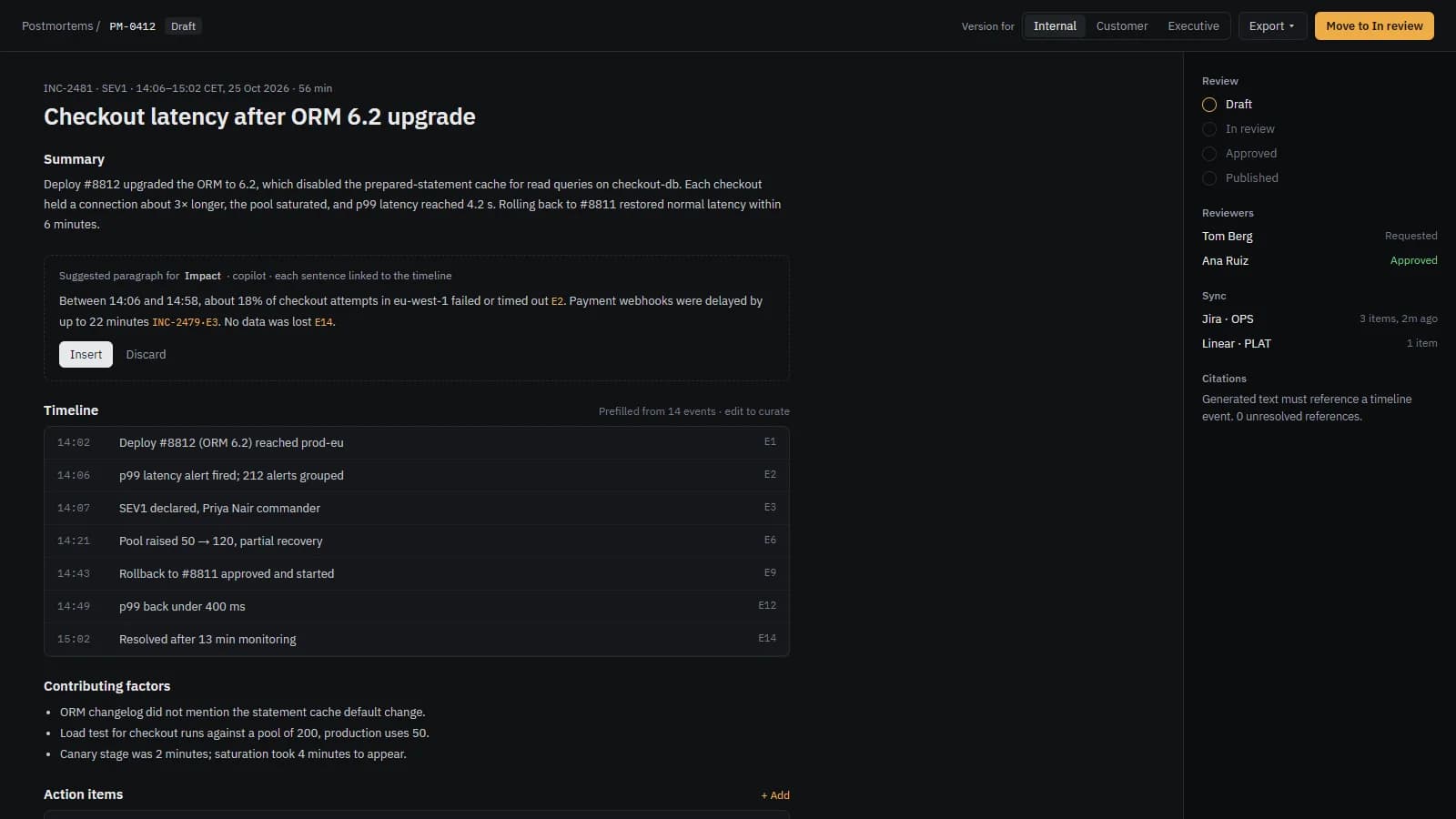
Postmortem draft pre-filled from the incident timeline, with roles, milestones and action items.
Postmortem draft · Sample data
  • Pre-filled from the timeline, roles, milestones and action items.
  • Reviewed and signed off by several people before it is final.
  • A sanitising step before anything is published.
  • Recurrence links to earlier incidents with the same cause.
  • Action items with owners, reminders and ticket sync.

Timing for each incident and across them

Time to detect, acknowledge, contain and recover, and the time spent in each status. Scheduled reports go to the people who review them. Drills, which are test incidents, are excluded from the metrics.

Timing report showing time to detect, acknowledge, contain and recover across recent incidents.
Timing report · Sample data
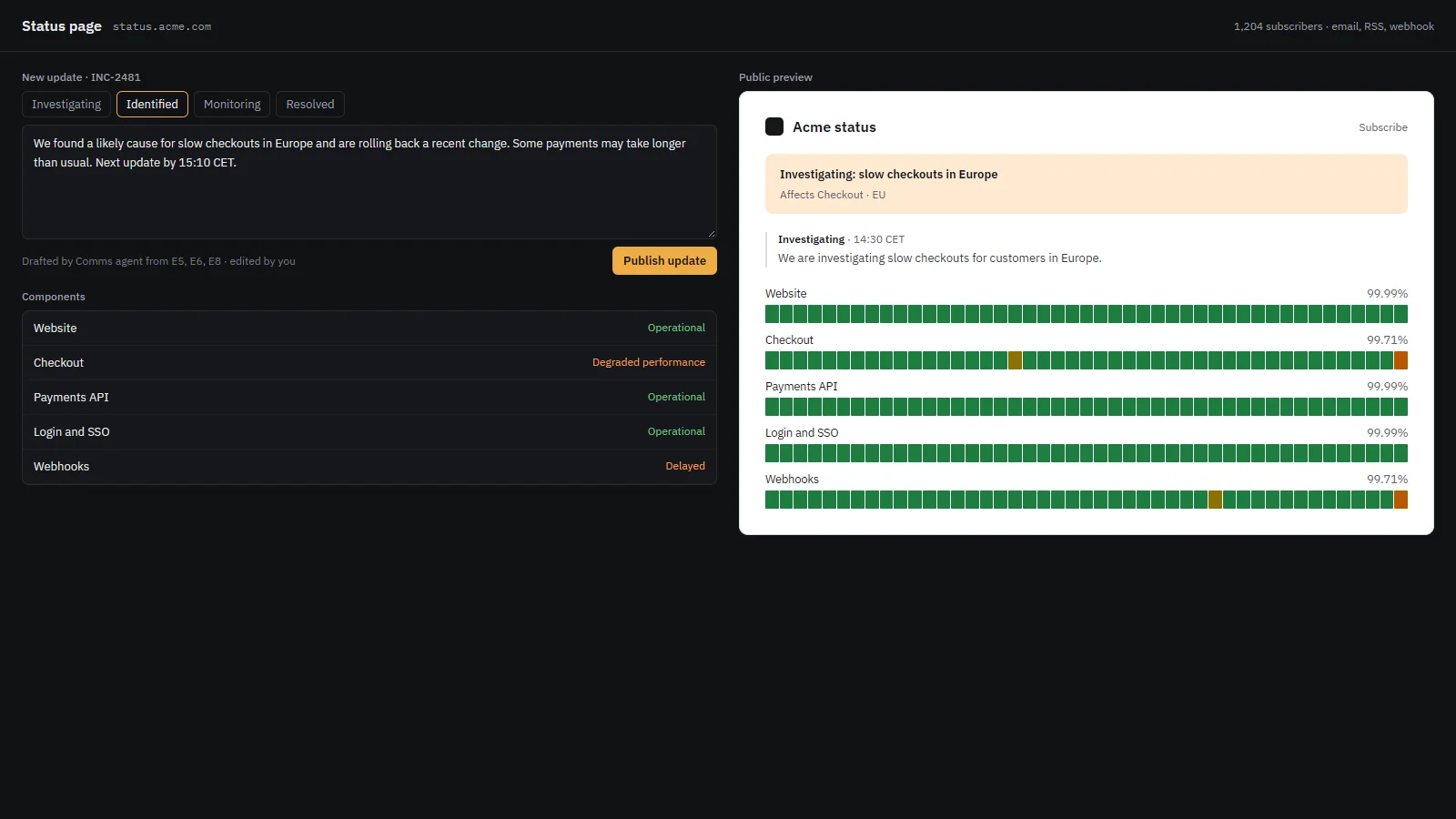
Public status page with the current status of each service and the updates posted during an incident.
Public status page · Sample data

Status page and service catalog

Customers see the same updates your responders post.

  • A public status page with subscribers, fed by incident updates.
  • A service catalog with owners and dependencies, which drives routing.
  • Maintenance windows suppress alerts and show on the timeline.

AI, under your control

The copilot is optional, and a person approves every action.

  • Off unless you turn it on.
  • Runs against your own model, including a local model that works offline.
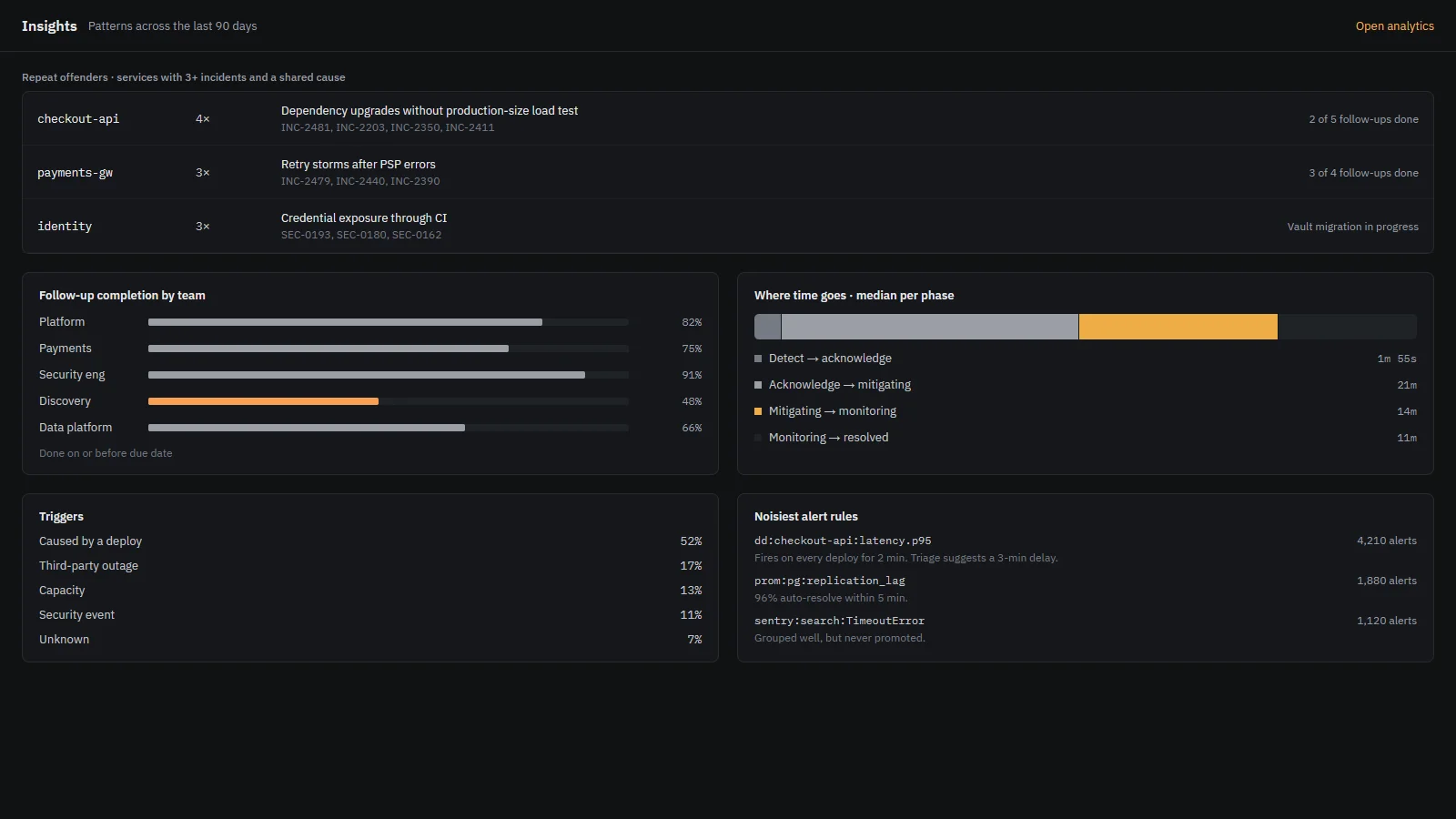
  • Summaries, suggested status updates, similar-incident search and postmortem drafts.
  • Every generated claim links back to a timeline event.
  • An activity log shows everything an agent did.
  • Never autonomous. An agent proposes, and a person approves.

Summary · written by the copilot from 8 events at 14:38

Checkout p99 latency rose from 380 ms to 4.2 s at 14:06, four minutes after a deploy reached production E1. The checkout database connection pool was saturated E5. Raising the pool size recovered some throughput E6.

Sample data

Activity log

  1. 14:39Investigation proposed a rollback. Waiting for approval.
  2. 14:40Comms proposed a status update. Approved by a person, then posted.
  3. 14:41Triage proposed paging the payments owner. Declined.

Model

  • AI off: no model is called.
  • Your model endpoint.
  • Local model, offline.

Sample data

Security and deployment

Your deployment, your data.

Incident records hold the details of what broke and who was affected. They are treated that way: isolated per tenant, access-checked in the database and exportable.

  • A tamper-evident audit log with an integrity check and an export.
  • Per-tenant isolation enforced in the database, not only in the interface.
  • Role-based access, SAML/SSO and SCIM.
  • Retention policies and legal hold.
  • Incoming and outgoing webhooks, a Terraform provider and SDKs.
  • Built for audit and designed for compliance teams. No certification is claimed here.

Cloud

BlueDefense hosts it. Updates and backups run without your team doing the work.

  • Managed updates
  • Managed backups
  • Same feature set

Self-hosted

Runs in your own infrastructure from a Helm chart. You control the network, the database and the data.

  • Helm chart
  • Your database
  • Your network rules

Moving from another tool? Importers for common pager and service-desk tools bring existing data across, and your team stays where it is until the switch-over is planned with you.

Pricing

How pricing works.

Pricing is not published yet. Resolvo is pre-launch, and the model is being settled with the first partners instead of being announced and then changed.

The model

Subscriptions are sized by the number of people who respond to incidents. Observers, stakeholders who only read updates, are counted separately.

[PLACEHOLDER: pricing model]

What is included

  • The process engine and starter processes
  • On-call schedules, alert routing and chat rooms in Slack or Teams
  • The security module, evidence vault and regulatory clocks
  • Postmortems, action items and timing reports
  • Cloud or self-hosted deployment

[PLACEHOLDER: what is included]

Founding design partners

  • A limited number of founding design partners, each with a direct line to the people building the product.
  • Your process is set up with you, and the workflows you need are reviewed every week.
  • Terms are agreed with each partner and written into the contract.

[PLACEHOLDER: founding design partner terms]

No price is stated on this page. If you want the numbers for your team, ask in a walkthrough.

Questions

What teams ask before a walkthrough.

Does Resolvo replace Slack?

No. Resolvo works inside Slack and Microsoft Teams. Each incident gets a room in the chat tool your team already uses, with the same summary card, roles and actions. The incident record stays in Resolvo, so the timeline and the postmortem do not depend on chat history.

Can we change the process?

Yes. Each team defines its own stages, gates, rules, severities and intake questions. Start from a ready-made process, edit it, and dry-run a change on a real incident before it goes live. Nothing runs from a hidden default.

Where does our data live?

In the deployment you choose. Cloud deployments are hosted by BlueDefense at [PLACEHOLDER: hosting location and provider]. Self-hosted deployments run in your own infrastructure. Private incidents are enforced in the database, not only in the interface.

Does the AI see our data?

Only if you turn it on. The AI copilot is optional and runs against your own model, including a local model that runs offline. Every generated claim links back to a timeline event, and the activity log shows what the copilot did. An agent proposes and a person approves.

Can we self-host?

Yes. Self-hosted installs use a Helm chart and run in your own infrastructure, so your incident data stays there.

How do we migrate from our current tool?

Importers for common pager and service-desk tools move existing data across. Your team stays in its current tool until the switch-over is planned with you.

What about Microsoft Teams?

Teams is supported at the same depth as Slack: the same incident room, summary card and actions. Teams is a first-class chat tool here, not an add-on.

What does it cost?

Pricing is explained in the pricing section of this page. Pricing is decided with founding design partners, so no price is published yet.

Next step

See the process engine run on your own incident.

A walkthrough takes about half an hour. Bring one incident your team handled recently and we will map it into Resolvo while you watch.

Until the demo link is ready, this opens an email to contact@bluedefense.de.